
In enterprise network planning, one question appears again and again: if a Layer 3 switch already supports routing, can it replace a router? At first glance, the answer seems simple. A Layer 3 switch can route traffic between VLANs, forward IP packets, and handle large volumes of internal traffic. However, in real network engineering, the two devices are not designed for the same job.
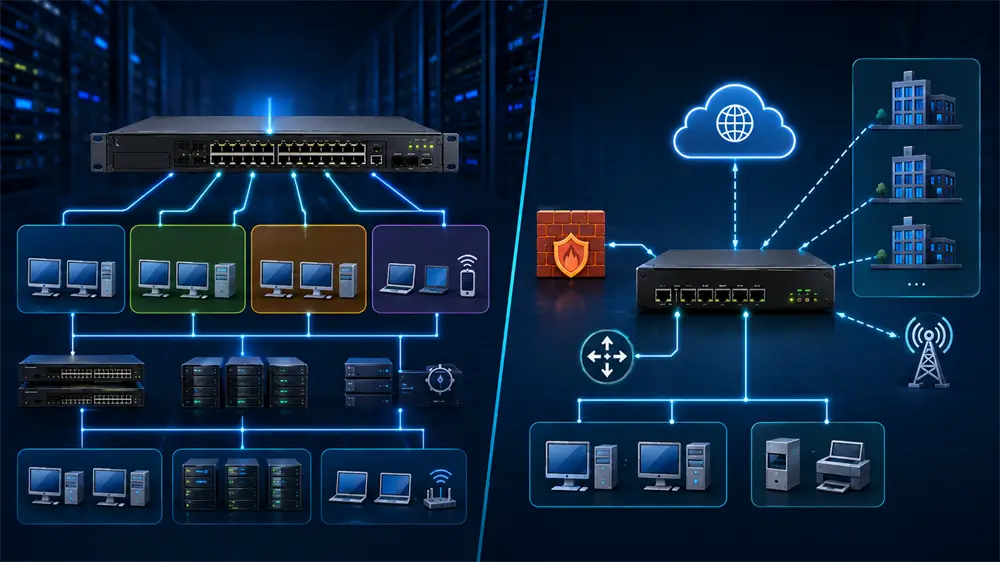
A Layer 3 switch is built for high-speed LAN forwarding. A router is built for network boundary control. This difference explains why mature enterprise networks still use both.
What Does a Layer 3 Switch Do Best?
A Layer 3 switch combines traditional switching with IP routing. Like a Layer 2 switch, it forwards Ethernet frames inside a LAN. Unlike a pure Layer 2 switch, it can also make forwarding decisions based on IP addresses, which allows communication between different VLANs or subnets. VCOM explains that Layer 3 switches are commonly used when multiple VLANs, several IP subnets, heavy internal LAN traffic, or core/aggregation switching are required.
This makes Layer 3 switches extremely valuable in offices, schools, hotels, surveillance systems, factories, and enterprise campuses. For example, a company may separate finance, R&D, guest Wi-Fi, IP cameras, and office computers into different VLANs. When approved traffic needs to move between these VLANs, a Layer 3 switch can route it locally without sending every packet to an external router.
Cisco also documents inter-VLAN routing with Catalyst switches, noting that VLANs divide devices into distinct Layer 3 subnets and that communication between different VLANs requires a routing device. Modern switches can integrate this routing function directly into the switch.
In simple terms, a Layer 3 switch solves the question: how can internal network traffic move faster and more efficiently?
What Is a Router Designed to Do?
A router is not merely a slower version of a Layer 3 switch. Its main value is at the network edge, where the LAN meets the WAN, the internet, a branch office, a data center, or a cloud service.
Routers and firewall gateways commonly handle WAN access, NAT, VPN, multi-ISP routing, security zones, traffic policies, and advanced routing control. Juniper’s NAT documentation, for example, describes NAT configuration for multiple ISPs, showing how edge devices manage address translation in complex internet-access environments. Fortinet also describes L3 NAT/route mode as a perimeter deployment mode in which the firewall operates as a Layer 3 router and routes traffic between network segments, especially in perimeter SD-WAN installations.
In practical terms, a router answers a different question: how should the internal network connect to external networks securely, reliably, and controllably?
Why a Layer 3 Switch Cannot Fully Replace a Router
The first reason is design purpose. A Layer 3 switch is optimized for internal forwarding performance. A router is optimized for edge connectivity and policy control. One focuses on LAN efficiency; the other focuses on WAN access, routing decisions, and security enforcement.
The second reason is WAN support. Many Layer 3 switches are primarily Ethernet-based devices. Routers and edge gateways are more suitable for PPPoE, leased lines, MPLS, broadband access, 4G/5G backup, SD-WAN, and multi-carrier environments. When an enterprise needs stable internet access or multiple external links, a router or firewall gateway remains the more appropriate device.
The third reason is NAT and security. Some Layer 3 switches support ACLs or basic routing policies, but they are not designed to be full security gateways. Enterprise internet edges often require source NAT, destination NAT, VPN tunnels, application control, firewall policy, intrusion prevention, logging, and traffic auditing. VCOM’s own switch guidance states clearly that Layer 3 switches are excellent for LAN routing, while routers and firewalls remain important for internet access, NAT, VPN, WAN connections, and advanced security inspection.
The fourth reason is routing-policy depth. A Layer 3 switch can usually handle static routing, inter-VLAN routing, and common internal routing protocols. However, multi-exit enterprise networks may require BGP, route filtering, redistribution, policy-based routing, traffic engineering, and failover logic. These functions are usually stronger and more stable on routers, firewalls, or SD-WAN edge devices.
The Right Enterprise Network Structure
A practical enterprise design does not force one device to do everything. The better approach is layered architecture.
At the access layer, Layer 2 switches connect computers, printers, IP cameras, access points, VoIP phones, and other endpoints. At the aggregation or core layer, Layer 3 switches handle VLAN routing, internal segmentation, and high-speed forwarding. At the edge layer, routers or firewalls manage internet access, NAT, VPN, WAN links, and security policies.
Cisco’s inter-VLAN routing example reflects this structure: the Catalyst switch performs inter-VLAN routing, while internet-bound traffic is forwarded to a Cisco router or another internet gateway such as a firewall. This is also the design VCOM recommends: Layer 2 switches connect endpoints, a Layer 3 switch handles VLAN routing and aggregation, and a firewall or router manages internet access and security policies.
VCOM Recommendation: Build the Whole Connection Chain Correctly
A stable network is not created by one switch or router alone. Cabling quality, patch panels, fiber links, rack layout, power stability, and uplink planning all affect performance. VCOM’s Network Engineering portfolio includes copper systems such as Cat5e, Cat6, Cat6A, Cat7, and Cat8 solutions, as well as fiber optical cables, fiber patch cords, patch panels, cabinets, and network tools for structured cabling projects.
For small offices, a managed Layer 2 switch plus a router/firewall may be enough. For growing companies, a Layer 3 switch should be added at the aggregation layer to handle VLAN routing. For surveillance, wireless AP, or VoIP deployments, PoE capability and cable quality should be checked early. For high-bandwidth backbones, Cat6A, Cat8, or fiber infrastructure should be considered.
FAQ
Can a Layer 3 switch connect to the internet?
Technically, some models can forward traffic toward an internet gateway. However, for NAT, firewall, VPN, WAN failover, and security inspection, a router or firewall is still the better edge device.
When should a Layer 3 switch be used?
Use it when the LAN has multiple VLANs, multiple subnets, heavy internal traffic, or a need for scalable aggregation/core switching.
What is the best design?
Use Layer 2 switches for endpoints, Layer 3 switches for internal routing, and routers or firewalls for WAN access and security. This structure delivers both performance and control.
Tag:Layer 3 Switch,Router