
A reliable network does not depend only on routers, switches, or broadband speed. The Ethernet cable between each device is equally important. A cable with the wrong category, poor shielding, or incorrect termination can limit speed, increase interference, or make a network unstable.
For home users, a good Ethernet cable ensures smoother 4K streaming, lower gaming latency, and more stable smart home connections. For offices, surveillance systems, server rooms, and data centers, the right cable directly affects bandwidth, reliability, and future upgrade cost. This guide explains how to identify common Ethernet cable categories and select the correct cable for each application.
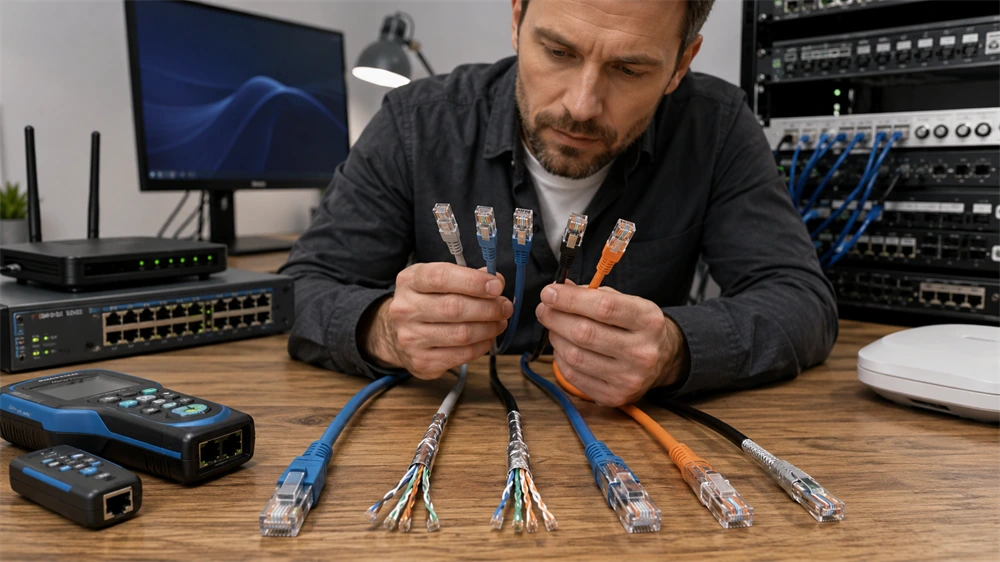
What Are Ethernet Cable Categories?
Ethernet cables are classified by performance categories such as Cat5e, Cat6, Cat6a, Cat7, and Cat8. These categories define key parameters including frequency, supported speed, shielding requirements, and recommended transmission distance.
A higher category usually means higher bandwidth and better resistance to crosstalk, but it does not always mean the cable is the best choice. For many homes, Cat6 or Cat6a is more practical than Cat8. For data centers, Cat8 may be necessary for short-distance 25Gbps or 40Gbps connections.
Cat5e: Practical Gigabit for Homes and Small Offices
Cat5e, or enhanced Category 5, is one of the most widely used Ethernet cable types. It operates at 100MHz and supports Gigabit Ethernet up to 1Gbps over a maximum channel distance of 100 meters.
Cat5e is suitable for basic home networks, small offices, printers, access points, IP cameras, and general Internet access. It is affordable, flexible, and easy to install. However, it is not ideal for high-density cabling environments or future 10Gbps upgrades.
Cat6: A Balanced Choice for Modern Networks
Cat6 cable increases the frequency to 250MHz. It supports 1Gbps at 100 meters and can support 10Gbps over shorter distances, typically up to 55 meters under proper installation conditions.
Many Cat6 cables use a central cross separator inside the jacket to reduce crosstalk between twisted pairs. This structure makes the cable slightly thicker and less flexible than Cat5e, but it improves signal stability. For gaming setups, office workstations, 4K streaming, and general structured cabling, Cat6 offers a strong balance between cost and performance.
Cat6a: 10Gbps Over Longer Distances
Cat6a, or augmented Category 6, supports 500MHz frequency and 10Gbps transmission over a full 100-meter channel. Compared with Cat6, it provides stronger alien crosstalk control and better electromagnetic interference resistance.
Cat6a is a strong recommendation for new office cabling, enterprise networks, Wi-Fi 6/6E/7 access point backhaul, PoE devices, and equipment rooms. Although it is thicker and usually more expensive than Cat6, it offers better long-term value when 10Gbps network upgrades are expected.
Cat7: Fully Shielded for High-Interference Environments
Cat7 cable is commonly associated with 600MHz frequency and 10Gbps transmission over 100 meters. It usually adopts S/FTP shielding, meaning each twisted pair has individual foil shielding, and the whole cable also has an outer braided shield.
This design gives Cat7 excellent resistance to electromagnetic interference and crosstalk. It is suitable for industrial environments, medical facilities, equipment rooms, and areas with dense cabling. For ordinary home use, however, Cat7 may be more than necessary, especially when Cat6a already supports 10Gbps over 100 meters.
Cat8: High-Speed Cable for Data Centers
Cat8 is designed for professional high-speed network environments. It supports up to 2000MHz frequency and 25Gbps or 40Gbps transmission over short distances, usually up to 30 meters. Unlike many lower-category cables, Cat8 is shielded by design and requires proper grounding and termination practices.
Cat8 is mainly used between switches, servers, storage equipment, and patch panels in data centers. For residential networks, Cat8 is usually unnecessary because most home devices, routers, and switches do not support 25Gbps or 40Gbps Ethernet.
T568A vs T568B: What Is the Difference?
RJ45 Ethernet connectors usually follow one of two wiring standards: T568A or T568B. The difference is the position of the green and orange wire pairs.
T568A sequence: white-green, green, white-orange, blue, white-blue, orange, white-brown, brown.
T568B sequence: white-orange, orange, white-green, blue, white-blue, green, white-brown, brown.
In real network performance, T568A and T568B do not create a speed difference. The key rule is consistency. A straight-through cable uses the same wiring standard on both ends, such as T568B to T568B. A crossover cable uses T568A on one end and T568B on the other, although modern network equipment usually supports auto-MDI/MDIX and rarely requires manual crossover cables.
UTP, F/UTP, and S/FTP Shielding Explained
UTP stands for Unshielded Twisted Pair. It has no shielding layer and relies on twisted pair design to reduce interference. It is affordable and easy to install, making it suitable for homes and standard office environments.
F/UTP has an overall foil shield around all pairs. It offers better resistance to electromagnetic interference while keeping the cable simpler than fully shielded designs. It is useful in equipment rooms, office ceilings, and environments near power cables or machinery.
S/FTP provides the strongest protection. Each pair has foil shielding, and the cable also has an outer braided shield. It is suitable for data centers, industrial automation, medical systems, and high-density cabling.
How to Identify Ethernet Cable Category Quickly
The easiest method is to check the printing on the cable jacket. Standard Ethernet cables usually mark “Cat5e,” “Cat6,” “Cat6a,” “Cat7,” or “Cat8” directly on the sheath.
Cable thickness is another clue. Cat6 and above are generally thicker than Cat5e, and Cat6 often has an internal separator. Cat6a, Cat7, and Cat8 are usually stiffer because of larger conductors, shielding layers, or both.
The connector also provides hints. Shielded Cat6a, Cat7, and Cat8 cables often use metal-shielded RJ45 connectors. A cable tester can further confirm continuity, wiring order, and basic faults, while professional certification testers are required for full-bandwidth verification.
How to Choose the Right Ethernet Cable
For basic home networks, Cat5e is still usable, but Cat6 is a better modern choice. For new home renovation or office wiring, Cat6a is the safer long-term option because it supports 10Gbps over 100 meters.
For gaming and streaming, Cat6 or Cat6a is usually enough. For IP cameras, access points, and PoE devices, choose pure copper conductors and avoid copper-clad aluminum cable. For industrial or high-interference environments, shielded Cat6a, Cat7, or Cat8 is recommended.
For data centers and short server-to-switch links, Cat8 is the correct choice when 25Gbps or 40Gbps transmission is required.
FAQ
Is Cat8 better than Cat6a for home use?
Not always. Cat8 is faster on paper, but most home equipment cannot use its 25Gbps or 40Gbps capability. Cat6a is usually more practical.
Can Cat6 support 10Gbps?
Yes, Cat6 can support 10Gbps over shorter distances, commonly up to 55 meters. For 10Gbps over 100 meters, Cat6a is recommended.
Does T568B perform better than T568A?
No. Both perform the same when terminated correctly. The important point is using the same standard consistently on both ends for a straight-through cable.
Which Ethernet cable does VCOM recommend for new installations?
For most new home and office projects, VCOM recommends Cat6 or Cat6a pure copper Ethernet cables. For industrial, data center, and high-interference environments, shielded higher-category cables should be selected based on distance and bandwidth requirements.
Tag:Ethernet Cable