Wirelessly mirroring an iPhone screen to a big TV has become essential for movie nights, presentations, gaming, or sharing photos without squinting at a small display. While Apple’s AirPlay works well on compatible devices, most users seek a universal solution that functions with any TV—no smart features required.
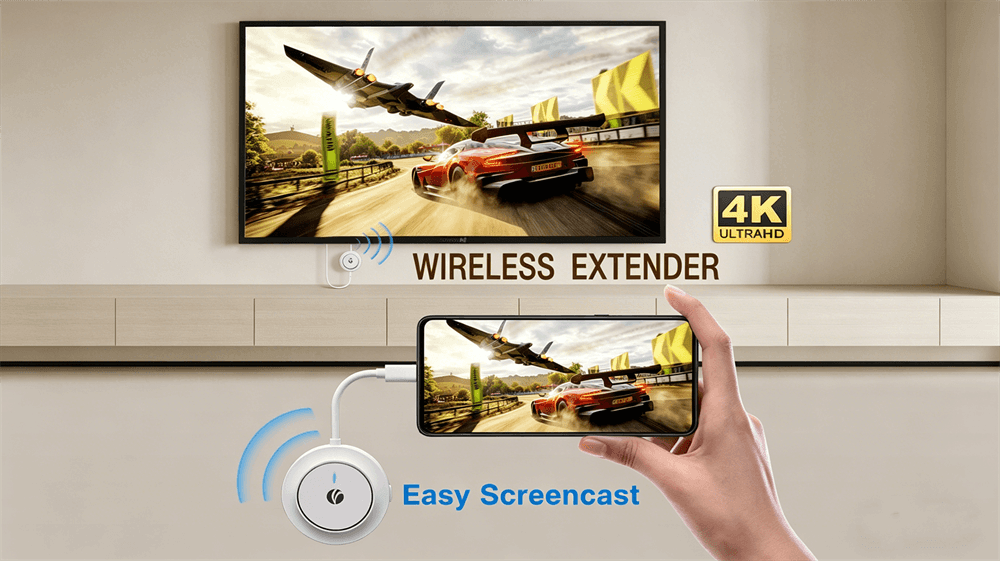
The VCOM DD543 4K Wireless HDMI ScreenCast provides true plug-and-play 4K@30Hz wireless mirroring from iPhone 15 and later models (with USB-C) directly to any HDMI-equipped TV. No Wi-Fi router, no apps, no lag, and no subscriptions are necessary.
Why Screen Mirror Your iPhone to a TV?
Screen mirroring unlocks several practical benefits:
Enjoy Netflix, YouTube, or Disney+ in stunning 4K on a large screen.
Present slides or apps professionally without cables.
Play mobile games on TV with zero input lag.
Share family photos and videos instantly.
Keep the iPhone charged during mirroring thanks to built-in PD 3.0 charging support.
The right tool makes all the difference—and the VCOM DD543 delivers where other solutions fall short.
Common iPhone-to-TV Methods and Their Major Disadvantages
Before examining the VCOM DD543, the limitations of common alternatives deserve attention:
Apple AirPlay (Native Wireless Mirroring)
How it works: Swipe down to Control Center → Screen Mirroring → select Apple TV or AirPlay 2-compatible smart TV.
Disadvantages: Requires the same Wi-Fi network (no guest networks or public Wi-Fi), works only with compatible TVs, experiences occasional stuttering or lag on busy networks, offers limited range, and some apps block full mirroring due to DRM. Older TVs require an Apple TV box ($149+).
Wired HDMI Adapter (Lightning/USB-C to HDMI)
How it works: Connect Apple’s official adapter plus an HDMI cable.
Disadvantages: Messy cables restrict movement, eliminate wireless freedom, cause the adapter to overheat during long sessions, and keep the user tethered to the TV. This setup is impractical for living rooms or presentations.
Chromecast, Fire TV Stick, or Third-Party Apps
How it works: Install apps such as DoCast or AirScreen and stream via Wi-Fi.
Disadvantages: Requires internet or Wi-Fi, involves purchasing an extra device, drains battery through app permissions, introduces noticeable latency (especially for games and videos), delivers poor full-screen mirroring, and creates compatibility issues with protected content. Setup is never truly plug-and-play.
Built-in Smart TV Mirroring (Samsung Smart View, LG Screen Share, etc.)
Disadvantages: Brand-specific, often requires firmware updates and accounts, suffers from lower resolution or latency issues, and still depends on the home Wi-Fi network.
These methods either rely on cables, demand specific hardware, force Wi-Fi dependency, or create frustrating lag and setup complications.
Meet the VCOM DD543: The Game-Changing Wireless HDMI Extender
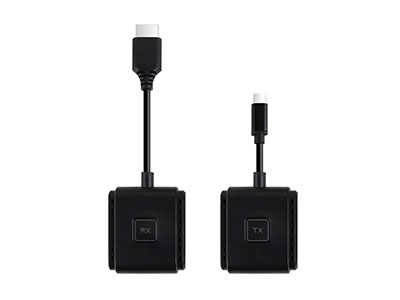
The VCOM DD543 is a portable 4K Wireless HDMI ScreenCast kit that includes a USB-C transmitter and HDMI receiver. It operates on its own dedicated 5G WiFi (802.11ac) for direct point-to-point transmission—no router, no internet, and no apps required.
Key specs:
Up to 4K@30Hz (or 1080p@60Hz) with H.265/VP9 low-latency encoding.
100 ft (30m) obstacle-free range / 50 ft (15m) through walls.
PD 3.0 100W charging port on the transmitter (charges the iPhone while mirroring).
Plug-and-play compatibility with iPhone 15/16 series (USB-C video output), Android, Windows, and macOS.
Lightweight design (30g) with a compact form factor and a one-click screen projection switch.
The device transforms any TV, monitor, or projector with an HDMI port into a wireless display within seconds.
Step-by-Step: How to Screencast iPhone to TV with VCOM DD543
Compatibility note: The kit works natively with iPhone 15 and later (USB-C models). Older Lightning iPhones require a Lightning-to-HDMI adapter first, followed by a standard HDMI connection. USB-C models provide the smoothest plug-and-play experience.
Unbox and Prepare
Transmitter (USB-C male + PD charging port).
Receiver (HDMI male + USB-C power input).
USB-C power cables/adapters (included or use any 5V/2A charger).
Set Up the Receiver
Plug the receiver’s HDMI end into any open HDMI port on the TV.
Connect the receiver’s USB-C port to a power adapter (5V/2A) and plug it in. The LED indicator lights up.
Connect the Transmitter to the iPhone
Plug the transmitter’s USB-C male connector directly into the iPhone 15/16 USB-C port.
Tap “Allow” when the iPhone prompts for accessory connection.
The transmitter automatically enters projection mode (use the one-click switch if needed).
Pair Transmitter and Receiver
The devices auto-pair via the built-in 5G WiFi (no manual network selection).
LED indicators confirm connection within seconds. Future reconnections occur in approximately 2 seconds.
Mirror the Screen
The iPhone screen now mirrors wirelessly on the TV in 4K.
Switch between mirroring and extension modes as needed.
Play videos, games, or apps—everything appears on the big screen with full audio.
Power Down
Unplug or use the one-click switch. The system remembers pairings for next use.
Total setup time is under 60 seconds. No Wi-Fi passwords or app downloads are required.
Endnote
The VCOM DD543 serves as the definitive solution for screencasting an iPhone to any TV. It eliminates the cables, Wi-Fi hassles, and compatibility issues found in every other method while delivering crisp 4K wireless video with zero compromise.
Whether streaming movies, presenting slides, or gaming on the big screen, this lightweight kit makes the process effortless. Adapters and apps can be set aside—true wireless freedom is available today.
Frequently Asked Questions (FAQ)
Q: Does VCOM DD543 work with older iPhones (Lightning port)?
A: Yes, when paired with a Lightning-to-HDMI adapter and standard HDMI connection. iPhone 15/16 USB-C models provide the smoothest plug-and-play experience.
Q: Do I need Wi-Fi or internet?
A: No. The DD543 uses its own built-in 5G WiFi network.
Q: What resolution and range does it support?
A: Up to 4K@30Hz, with a 30m (100 ft) line-of-sight range.
Q: Can the iPhone be charged while mirroring?
A: Yes—the transmitter includes a PD 3.0 100W charging port.
Q: Is it compatible with Android or laptops, too?
A: Yes—full support for USB-C Android phones, Windows, macOS, and more.
Cable-free 4K screencasting begins today with the VCOM DD543. The iPhone and TV deserve this upgrade.
Tag:Screencast,VCOM


Related Products
 | |
| Wireless HDMI Extender | |
 |  |